BacktotheBasic - 큐(queue)
March 03, 2018
##큐(queue)
큐는 리스트와 다르게 먼저 들어온 놈이 먼저들어가는 자료구조이다.
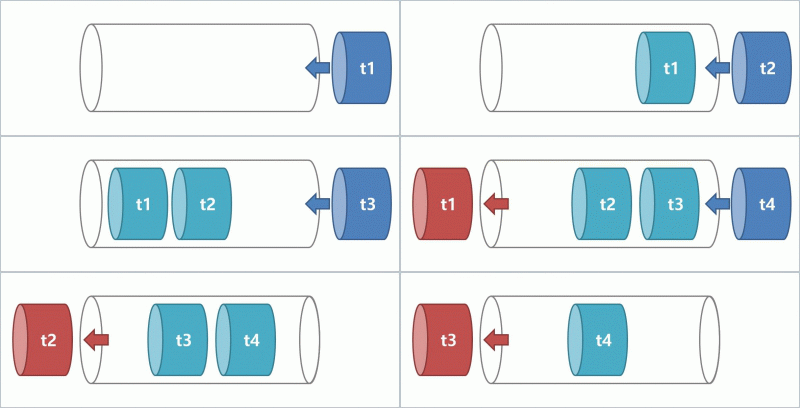
이런 큐의 문제점은 삭제로직에 있다.
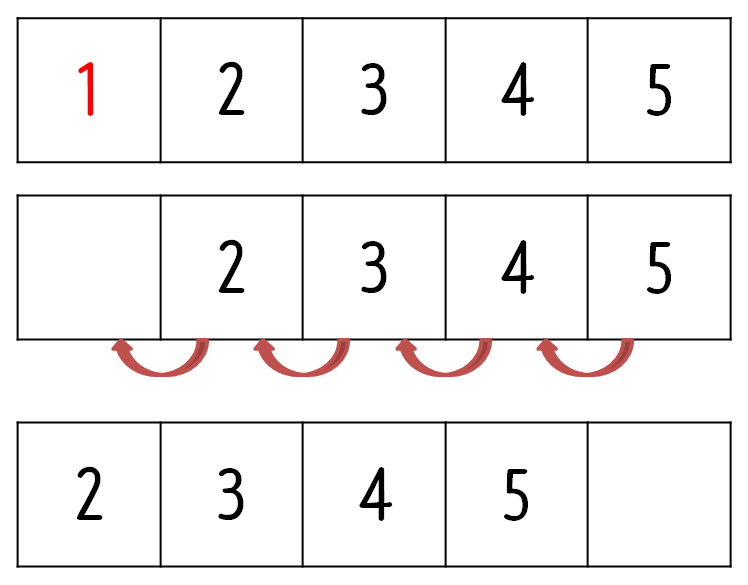
배열을 이용해서 큐를 만든 경우
맨처음 들어온 애를 삭제를 하면 뒤에 따라온 애들이 다 한칸씩 이동해야하는(shift연산) 번거로움이 있다는 것이다.
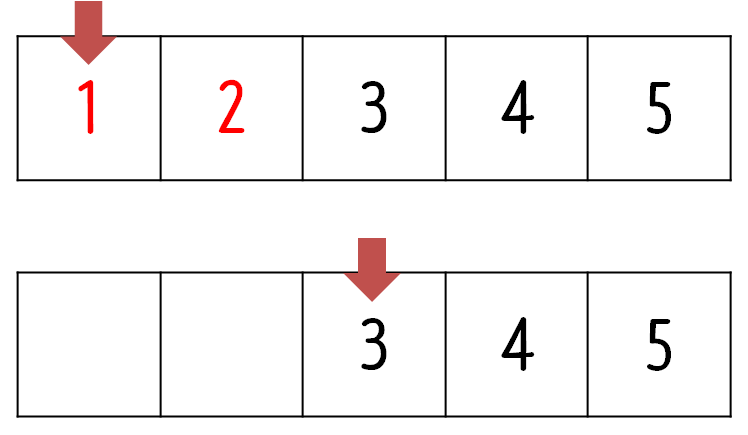
이런 번거로움을 해결하기 위해 전단이라는 변수를 이용해서 맨처음 들어온 놈의 인덱스만 관리를 하면 되는데
이경우에는 shift연산으로 인한 부하 문제는 해결 할 수있지만 제거 연산을 수행할 수록 큐의 가용 용량도 줄어든다.
그래서 등장한게 순환 큐이다.
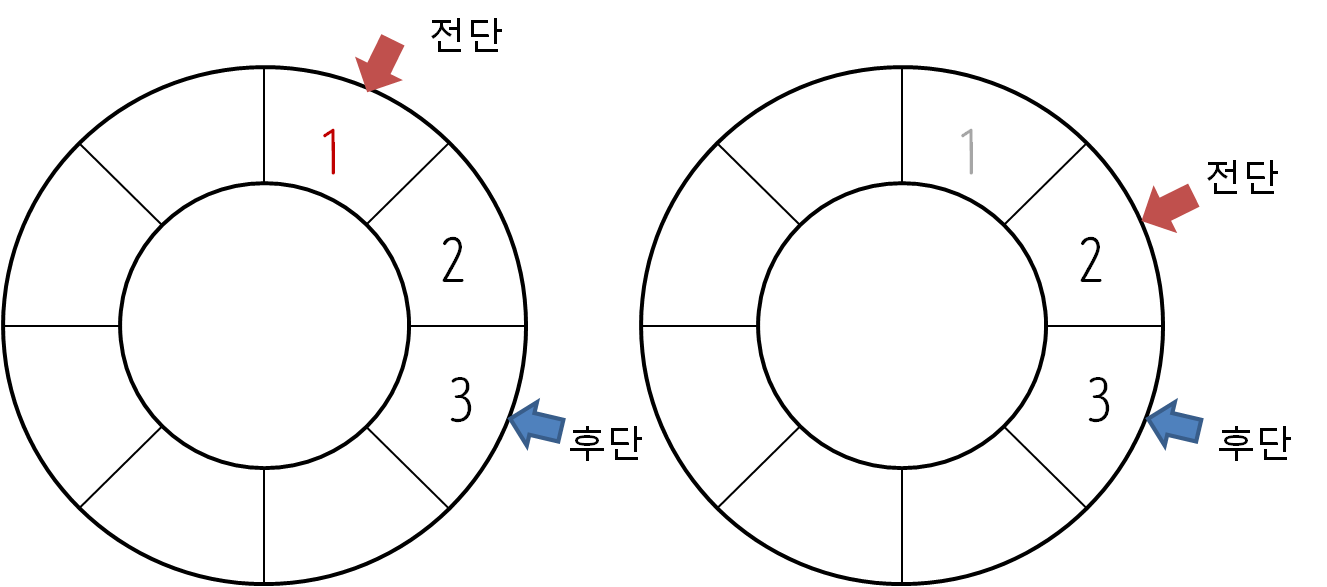
그러나 이 순환 큐에도 문제점이 존재한다.
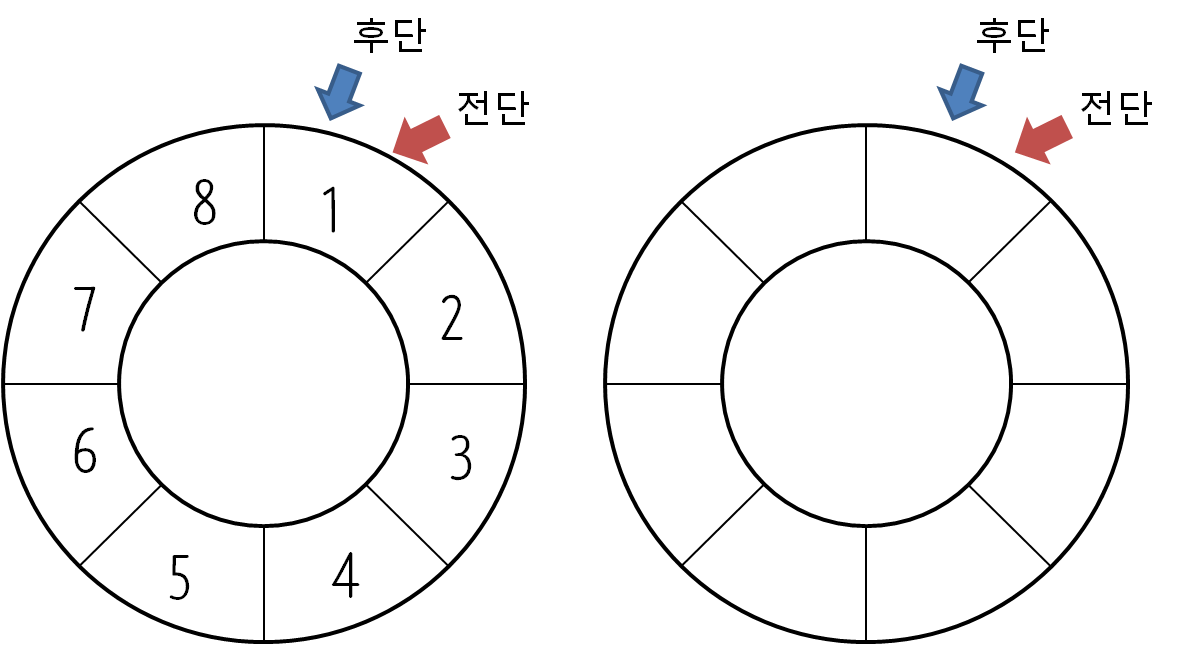
후단의 값은 실제의 후단에 1을 더한 값을 갖는데 큐가 모두 비어있어도 전단과 후단이 같은 인덱스를 가리키고, 모두 차있어도 같은 인덱스를 가리킨다. 즉, 큐가 비어있는지 꽉차있는지 확인 할수가 없다.
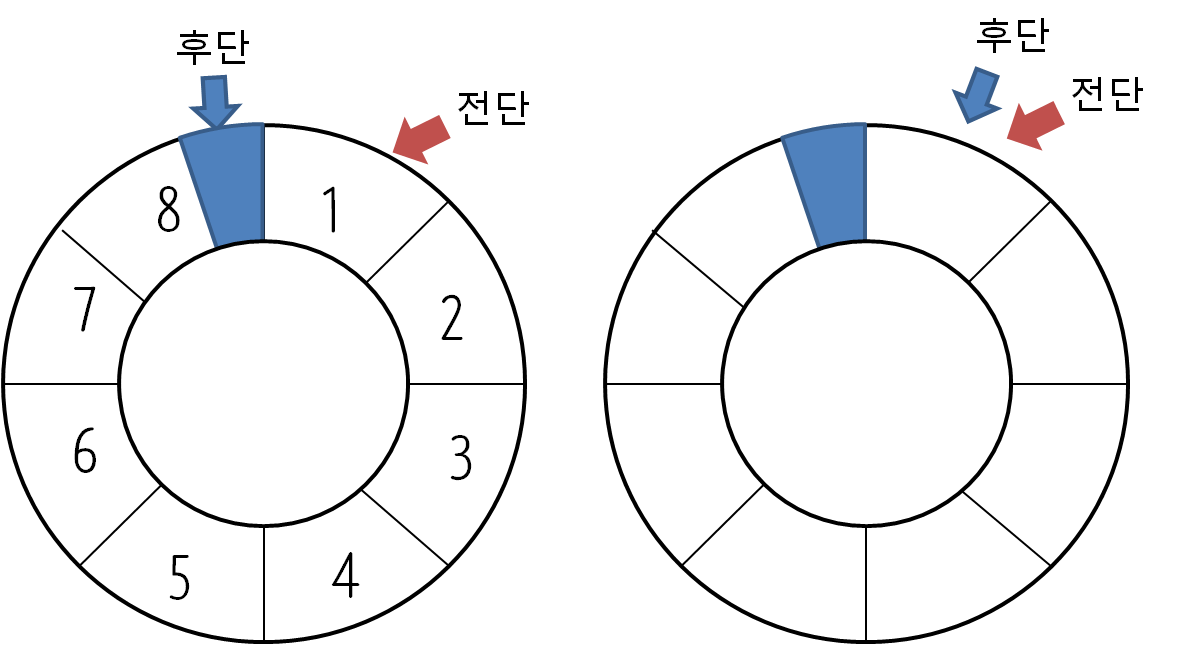
그래서 순환큐에서는 배열을 생성할때 실제 용량보다 1만큼 더 크게 만들고 전단과 후단사이를 비우게 한다. 큐가 비어있을땐 전단과 후단이 같은 인덱스를 가리키고, 큐가 꽉 차있는 경우에는 후단이 전단보다 1작은 값을 가지게 된다.
큐를 구현해 보았다.
 public class CircularQueue implements Queue{

 	private int capacity = 0;
 	private int Front=0, Rear=0;
 	private Object[] myArray;

 	public CircularQueue() {
 		this.capacity = 101; // 그냥 생성하면 default로 100개를 저장할 수 있는 array를 생성한다.
 		this.myArray = new Object[101];
 	}
 	public CircularQueue(int capacity) {
 		this.capacity = capacity;
 		this.myArray = new Object[capacity+1];
 	}
  public static void main(String[] args) {
     CircularQueue myqueue = new CircularQueue(5);
      myqueue.add("1");
      myqueue.add("2");
      myqueue.add("3");
      System.out.println(myqueue.toString());
      System.out.println(myqueue.pop().toString());
      System.out.println(myqueue.pop().toString());
      System.out.println(myqueue.pop().toString());
      myqueue.add("1");
      myqueue.add("2");
      myqueue.add("3");
      myqueue.add("4");
      myqueue.add("5");
      myqueue.add("6");
      System.out.println(myqueue.toString());
      System.out.println(myqueue.getArraytoString());

  }
  @Override
  public Object peek() {
    // TODO Auto-generated method stub
    return this.myArray[this.Front];
  }

  @Override
  public Object pop(){
  		if(isEmpty()){
  			System.out.println("this queue is empty!");
  			return null;
  		}
  		Object willPop = this.myArray[this.Front];
  		this.Front++;
  	    if(this.Front > capacity){
  	      this.Front = 0;
  	    }
   		return willPop;
  	}

 	public String toString(){
 		String result = "[";
 		int front = this.Front;
 		int rear = this.Rear;
 		if (rear < front){
 			rear += this.myArray.length;
 		}
 		result += this.myArray[front++].toString() ;
 		while(front < rear){
 			if(front > this.myArray.length-1){
 				result += "," + this.myArray[front++ - myArray.length].toString();
 			}else{
 				result += "," + this.myArray[front++].toString();
 			}
 		}

 		result += "]";

 		return result;
 	}

 	public String getArraytoString(){
 		String result = "[";
 		for(int i=0; i < myArray.length ; i++){
 			result += myArray[i];
 		}
 		result += "]";
 		return result;
 	}

 	@Override
 	public void add(Object obj) {
  		if(isFull()){
 			System.out.println("this queue is full of data");
 		}else{
 			System.out.println(this.Rear);
 			this.myArray[this.Rear] = obj;
			this.Rear += 1;

			if(this.Rear>this.capacity){
				this.Rear -= myArray.length;
			}
 			System.out.println("add" +  obj.toString() + "front : " +  this.Front + "   rear:  " + this.Rear);
 		}

 	}
 	public boolean isFull() {
 		 int rear = this.Rear;
 		 int front = this.Front;
 		 if(front == 0){
 			 front = capacity+1;
 		 }
 		if(rear == front-1){
 			return true;
 		}else{
 			return false;
 		}
 	}

 	@Override
 	public boolean isEmpty() {
 		if(this.Rear == this.Front){
 			return true;
 		}else{
 			return false;
 		}

 	}
  verride
 	public int getSize() {
 	  return this.capacity;
 	}
 	@Override
 	public void clear() {
 		this.Front = 0;
 		this.Rear = 0;
 	}

 }
만들고 나니까 front 나 rear를 옮길때마다 마지막 인덱스에서 0번째 인덱스로 순환시키는 로직이 계속해서 반복된다. 그래서 next()와 prev를 만들어 코드를 간결화 했다.
CircularQueue.java CODE
package task.structure;

public class CircularQueue implements Queue{

	private int capacity = 0;
	private int Front=0, Rear=0;
	private Object[] myArray;

	public CircularQueue() {
		this.capacity = 101;
		this.myArray = new Object[101];
	}
	public CircularQueue(int capacity) {
		this.capacity = capacity;
		this.myArray = new Object[capacity+1];
	}


	public static void main(String[] args) {
		 CircularQueue myqueue = new CircularQueue(5);
			 	myqueue.add("1");
				myqueue.add("2");
				myqueue.add("3");
				System.out.println(myqueue.toString());
				System.out.println(myqueue.pop().toString());
				System.out.println(myqueue.pop().toString());
				System.out.println(myqueue.pop().toString());
				myqueue.add("1");
				myqueue.add("2");
				myqueue.add("3");
				myqueue.add("4");
				myqueue.add("5");
				myqueue.add("6");
				System.out.println(myqueue.toString());
				System.out.println(myqueue.getArraytoString());
				System.out.println(myqueue.pop().toString());
				System.out.println(myqueue.pop().toString());
				System.out.println(myqueue.pop().toString());
				System.out.println(myqueue.pop().toString());
				System.out.println(myqueue.pop().toString());
				System.out.println(myqueue.pop().toString());
	}

	@Override
	public Object peek() {
		// TODO Auto-generated method stub
		return this.myArray[this.Front];
	}

	@Override
	public Object pop(){
		if(isEmpty()){
			System.out.println("this queue is empty!");
			return null;
		}
		Object willPop = this.myArray[this.Front];
		this.Front = next(this.Front);
 		return willPop;
	}

	@Override
	public String add(Object obj) {
 		if(isFull()){
			System.out.println("this queue is full of data");
		}else{
			System.out.println(this.Rear);
			this.myArray[this.Rear] = obj;

			this.Rear = next(this.Rear);

			System.out.println("add" +  obj.toString() + "front : " +  this.Front + "   rear:  " + this.Rear);
		}
 		return obj.toString();
	}
	@Override
	public boolean isEmpty() {

		if(this.Rear == this.Front){
			return true;
		}else{
			return false;
		}

	}

	public boolean isFull() {
		if(this.Rear== prev(this.Front)){
			return true;
		}else{
			return false;
		}

	}

	@Override
	public int getSize() {
	  return this.capacity;
	}
	@Override
	public void clear() {
		this.Front = 0;
		this.Rear = 0;
	}

	public String toString(){
		String result = "[";
		int front = this.Front;
		int rear = this.Rear;
		if (rear < front){
			rear += this.myArray.length; //front 보다 rear가 작다는건 뒤로 순환 되었다는거니까 array길이만큼 더해준다.
		}
		result += this.myArray[front].toString() ;
		while(front < rear-1){
			result += "," + this.myArray[next(front)].toString();
			front++;
		}

		result += "]";

		return result;
	}

	public String getArraytoString(){
		String result = "[";

		for(int i=0; i < myArray.length ; i++){
			result += myArray[i];
		}
		result += "]";
		return result;
	}

	public int next(int num){
		if(num > this.capacity-1){
			System.out.println(num + ": " + this.myArray.length);
			return ++num - this.myArray.length;
		}else{
			return ++num;
		}
	}
	public int prev(int num){
		if(num == 0){
			return num + this.myArray.length-1;
		}else{
			return --num;
		}
	}


}
한결 깔끔해지고 보기도 좋아졌다.